This is a guide to setting up your own mail server on a LINUX machine.
Let's break the guide into some easy steps:
You will need:
- - a computer with plenty of disk space (you probably want to store all email on the server as well as on your email clients)
- - an LINUX operating system (for example Centos 5 or 6, Ubuntu, RedHat etc)
- - a permanent/reliable connection to the Internet
Next you need to download the required software and copy it to your mail server computer.
- 1) Download Hexamail Server and save the tar.gz file and the license (you receive via email) onto the computer
- 2) Unpack the hexamailserver.tar.gz file using the command
- 3) This creates a subfolder called hexamailserver/ in which Hexamail will run. You can move this folder wherever you wish at this point
- 4) Switch to the extracted folder
- 5) View the INSTALL text file for the latest specific instructions for your version of the software
Now you can begin configuring Hexamail Server. After some initial steps you can use the webadmin to configure the rest of the settings
- 1) Copy the file hexamailserver.cfg.initial to hexamailserver.cfg
- 2) Edit the file hexamailserver.cfg
- 3) Fill in all the required settings listed in the file
Now you can run Hexamail for the first time
- 1) Switch to the root user. This is required to allow Hexamail to use the ports required for email (port numbers under 1024)
- 2) Run the script ./start.sh provided with the software to start the Hexamail service
- 3) Verify there are no problems with the startup by checking the Hexamail Server log. It should eventually say Starting processing...
- 4) You are now ready to connect to the webadmin and configure the other settings. To do this open a browser to http://yourservername:880/ If it is on this server use this link webadmin
The configuration settings are now the same as in the Windows Administration and you can use the same help file to read about the various options in the Administration sections here: Hexamail Server Help
In the WebAdmin press the help button on the page you are using to see help relating to that specific page of settings.
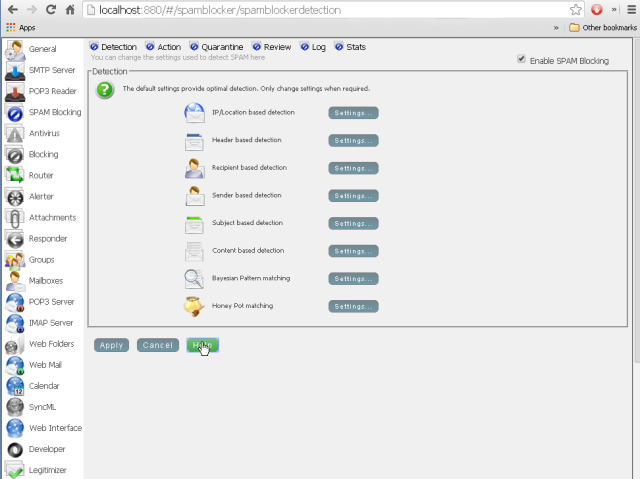
Alternatively you can configure most of Hexamail using the configuration file directly using the instructions in the Configuration section here: Hexamail Server Help
Hexamail Server is a full-featured mail server and can offer various services to email and calendar clients.
Here is a list of services and the ports that need to be opened on your firewall/router to access each service
| Service | Protocol | Port | Module | Description |
|---|---|---|---|---|
| Send/Recv Mail | SMTP | 25 | Used to send email to your server by other servers and send outbound email from email clients. NOTE some ISPs will block this port so clients may need to send via the ISP provided smarthost/smtp server or use SSL or an alternative SMTP port | |
| Send/Recv Mail | SMTP (SSL) | 465 | Used to send outbound email from email clients securely. Use the SSL setting in your mail client and specify port 465 if your ISP is blocking port 25 | |
| Check Email | POP3 | 110 | Used to download email from your server by email clients using the POP3 protocol | |
| Check Email | POP3 (SSL) | 995 | Used to download email from your server by email clients using the secure POP3 protocol | |
| Check Email | IMAP | 143 | IMAP Server | Used to download email from your server by email clients using the IMAP protocol |
| Check Email | IMAP (SSL) | 993 | IMAP Server | Used to download email from your server by email clients using the secure IMAP protocol |
| Check Email | Webmail | 8080* | Webmail | Used to check email using a web-browser |
| Check Email | Webmail (SSL) | 443* | Webmail | Used to check email using a web-browser |
| Sync Calendar/Tasks | CALDAV | 8080* | Calendar | Used to synchronize calendar clients using the CALDAV protocol |
| Sync Calendar/Tasks | CALDAV (SSL) | 443* | Calendar | Used to synchronize calendar clients using the secured CALDAV protocol |
| Sync Calendar/Tasks | SyncML | 8080* | SyncML+Calendar | Used to synchronize calendar clients using the Syncml protocol |
| Sync Calendar/Tasks | SyncML (SSL) | 443* | SyncML+Calendar | Used to synchronize calendar clients using the secured Syncml protocol |
| Remote Administration | HTTP | 23006 | Used for remote administration using the Windows Administration console | |
| Web Administration | HTTP | 880* | Used for remote administration using the Web Administration | |
| Developer Access | HTTP | 1880* | Developer | Used for developer access via REST/json from languages such as Javascript, Python, .net etc. |
In your firewall you should allow incoming TCP connections for each port listed that you require, and in your Router/NAT device setup a rule to forward TCP traffic on the listed ports to the computer running Hexamail
* As configured in your configuration file or administration interface, default settings are shown
Hexamail Server provides a complete, easy-to-deploy email server for Linux, including SMTP, IMAP, POP3, webmail, calendaring, task management and contact management in a single package. It supports SSL/TLS, STARTTLS, DKIM signing and built-in antispam, making it a powerful and self-contained alternative to complex open-source email server stacks.